



What Printer Works Best for On-Site Event Badge Printing?
There is no universal best printer because the output requirement changes the answer. Badge Wave sells a compact Zebra ZD621 direct thermal printer and Epson C4000e inkjet models. Both can personalise badges at the venue, and both may work with pre-printed full-colour stock. The important distinction is whether the variable attendee layer can be black or must be full colour, followed by media compatibility, integration, consumables, operator experience and the number of registration stations.
Review the Zebra ZD621 badge printer first if variable content is single colour. Compare it with the Epson option when colour is required at the point of check-in.

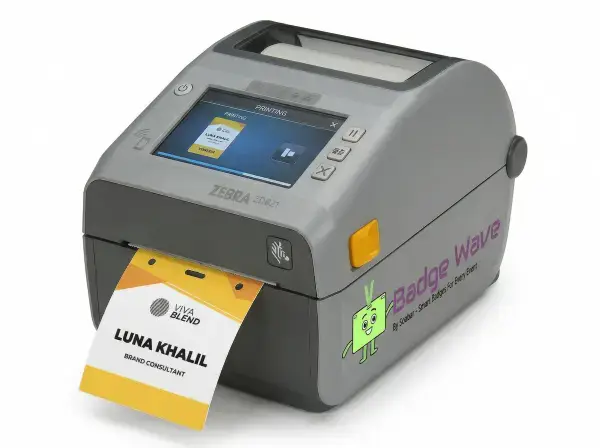
Choose the Zebra ZD621 for simple variable data
The ZD621 produces single-colour direct thermal output and Badge Wave lists speeds up to 203 mm per second in a compact desktop design. This is the central decision behind choosing the Zebra zd621 for simple variable data, because it determines what the attendee sees and what the registration team must deliver under pressure. Define the required result before comparing products, then separate essential functions from preferences that can change. This prevents a visual choice from creating an operational conflict later.
Use it for names, company details, roles and barcodes when full-colour artwork can be pre-printed. Use realistic names, roles, records, artwork and equipment rather than a perfect demonstration sample. Print the longest records and scan codes on compatible thermal stock. Document the approved result so every station starts from the same configuration.

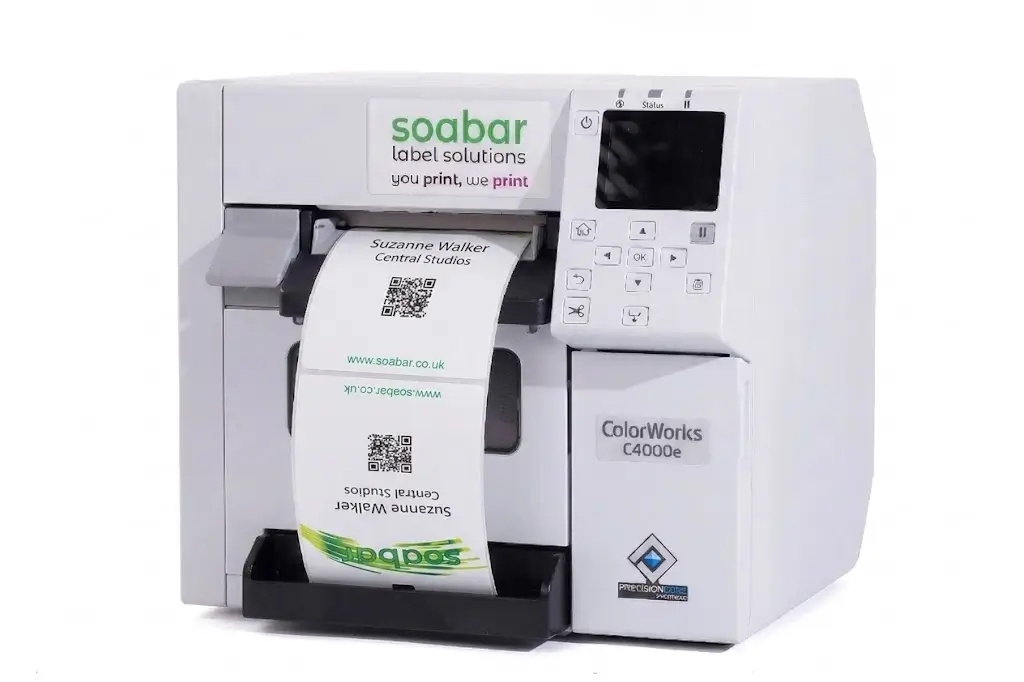
Choose the Epson C4000e for variable colour
The Epson uses four-colour pigment ink, supports output up to 1200 × 1200 dpi and suits changing logos, headshots and colour designs. The heading is practical rather than theoretical: the organiser needs a choice that works with the badge stock, data and event-day process. Consider the people, data and equipment involved at this exact stage. A decision is useful only when the team can apply it consistently during setup and live registration.
Use it only when variable colour adds a defined attendee, branding or access benefit. Use realistic names, roles, records, artwork and equipment rather than a perfect demonstration sample. Compare colour samples and verify dry, durable output on the intended coated media. Include exceptions as well as the normal attendee journey, because they usually expose the hidden delay or layout failure.
Match the printer to the badge material
Purchase cost includes printer, stock, accessories, ink where applicable, maintenance, storage and staff time; hire can include transport, deposits, damage terms, extensions and support charges. Treat this as a specification question, since a visually attractive option can still fail if it does not work in the intended registration environment. The specification should state what success looks like and what would make the option unacceptable. That gives artwork, registration and venue teams the same decision rule.
Build both options around the same event requirement and number of active stations. Use realistic names, roles, records, artwork and equipment rather than a perfect demonstration sample. Ask for itemised quotes and calculate cost over a realistic multi-event period.
Check software and device connectivity
The registration platform must be able to select a record, populate the approved template and send it to the printer. The best choice depends on the event requirement, but the relevant factors can be defined and tested before an order is approved. Resolve connectivity and software questions point before dependent work is approved. Late changes can affect templates, stock allocation, staff instructions and the reliability of earlier testing.
Confirm drivers, operating systems, connection method and any required middleware with the software provider. Use realistic names, roles, records, artwork and equipment rather than a perfect demonstration sample. Run the production application on the actual event laptop or tablet. Repeat this check whenever the relevant artwork, stock, data or equipment changes.
Plan for consumables and maintenance
The direct thermal workflow avoids ink for variable output, while the Epson requires CMYK cartridges and a maintenance box. Consumables and maintenance are central factors that should be considered in the decision making process, because it determines what the attendee sees and what the registration team must deliver under pressure. Use the event's real scale and attendee journey, not a generic best practice detached from the venue. A small meeting and a peak-arrival exhibition may need different answers.
Stock the correct consumables and train operators to recognise status messages and carry out approved routine actions. Use realistic names, roles, records, artwork and equipment rather than a perfect demonstration sample. Replace a consumable during rehearsal without disrupting another station. Use the outcome to set the staffing, stock or artwork rule for this event rather than relying on an assumed universal answer.
Size stations from peak demand
One high-specification printer may still be inadequate if hundreds of delegates arrive in a short window or each record requires manual correction. The heading is practical rather than theoretical: the organiser needs a choice that works with the badge stock, data and event-day process. Keep the choice of printer proportionate to its purpose. Additional fields, colours, devices or process steps should remain only when they solve a defined attendee or operational need.
Estimate arrivals per effective minute and decide how many identical stations are needed. Use realistic names, roles, records, artwork and equipment rather than a perfect demonstration sample. Measure complete service time under a realistic peak scenario. Keep a reference sample with the event kit so operators can distinguish correct output from a developing fault.
Consider portability and physical setup
The Zebra product page describes optional battery capability, while both printers still need a safe desk layout, stock access and cable management. Treat this as a specification question, since a visually attractive option can still fail if it does not work in the intended registration environment. Assign a key person for the decision and its acceptance check. Without ownership, teams may use different versions or make inconsistent corrections under pressure.
Map power, device, network and replenishment needs for each station. Use realistic names, roles, records, artwork and equipment rather than a perfect demonstration sample. Build one full station at the venue or in a scaled rehearsal area. Record who approved the result and which version was tested to prevent an earlier draft returning at venue setup.
Select for operational simplicity
A printer that exceeds the design requirement can add considerations and consumables without improving check-in. The best answer depends on the event requirement, but the relevant factors can be defined and tested before an order is approved. Include the fallback in the design rather than adding it after a failure. The alternative must preserve essential identity, access and registration functions.
Choose the least complex model that meets variable colour, quality, volume and integration needs. Use realistic names, roles, records, artwork and equipment rather than a perfect demonstration sample. Approve the decision only after the complete workflow passes a timed test. Run the fallback immediately after the main test and confirm that it preserves the essential function.
On-site printer selection checklist
Variable fields and colour requirements are documented.
The exact badge stock is approved for the printer.
Printer drivers and operating systems are confirmed.
Registration software can populate the final template.
Codes scan from production samples.
Peak arrivals determine the station count.
Consumables and maintenance responsibilities are assigned.
A fallback printer or process has been tested.
What to record in the approved event brief
The final brief for best printer for on-site event badge printing should state the decision reached by choosing the Zebra ZD621 for simple variable data, and the operational decision agreed for choosing the Epson CW4000e for variable colour, and the acceptance check used to match the printer to the badge material. It should also identify the owner of check software and device connectivity, the production or configuration version that passed testing, and the date after which changes require another approval. Include the relevant event date, in-hand date, expected attendance, peak arrival pattern, badge size and construction, printer model, stock reference, software or data source, attachment and delivery location. Record the edge cases used in testing, who may edit attendee records or authorise reprints, and the fallback that applies if the normal route is unavailable. This written brief gives design, registration, venue and supplier teams one source of truth. It also prevents a late request from quietly changing an assumption that earlier artwork, capacity or scanning tests depended on. After the event, compare the approved brief with actual queue, reprint, stock and support results so the next specification improves from evidence rather than memory.
The Zebra ZD621 is the relevant direct thermal option for fast single-colour variable information.
The Epson C4000e is the stronger choice when headshots or other variable full-colour images must be printed on site.
Yes. Badge Wave explains that fixed full-colour stock can be pre-printed, with variable information added at the event.
No. Completed check-in depends on search, verification, corrections, printing and handover, not only the engine speed.
Do not assume so. Thermal and inkjet stock use different coatings and must be matched to the exact printer.