




What Is the Difference Between Thermal and Inkjet Badge Printing?
The technologies solve different badge requirements. Badge Wave offers pre-printed full-colour stock for two workflows, so a thermal system can still produce a branded badge: the fixed artwork is printed before the event and the Zebra adds variable details in black. Epson inkjet stock can also be pre-printed, but the C4000e can produce variable information in full colour. The decision should therefore focus on what must change per attendee, the required visual quality, consumables, maintenance and the check-in environment.
Review both systems in Badge Wave's on-site badge printers category, then match the chosen printer to media explicitly designed for that technology.

How direct thermal printing works
Direct thermal media contains a heat-sensitive coating that darkens under the printhead, creating text, graphics and codes without a ribbon, toner or ink cartridge. This is the central decision behind whether direct thermal printing works for your event, because it determines the end badge result and what the registration team must deliver under pressure. Define the required end result (black print or colour) before comparing products, then separate essential functions from preferences that can change. This prevents a visual choice from creating an operational conflict later.
Use it when variable output can be single colour and rapid, straightforward operation is valuable. Use realistic names, roles, records, artwork and equipment rather than a perfect demonstration sample. Test density and scan performance on the production stock because the coating and printer setting affect the result. Document the approved result so every station starts from the same configuration.

How inkjet badge printing works
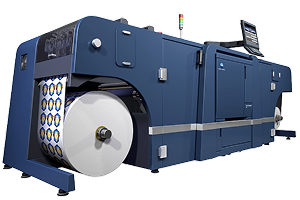
Inkjet places CMYK pigment ink onto specially coated media, allowing high-resolution, full-colour variable images and text. The organiser needs a choice that works with the badge stock, data and event-day process. Consider the people, data and equipment involved and whether inkjet printing is best.. A decision is useful only when the team can apply it consistently during setup and live registration.
Choose inkjet badge printing when changing logos, photographs, colour-coded designs or premium visual output must be printed on demand. Use realistic names, roles, records, artwork and equipment rather than a perfect demonstration sample. Print representative images and allow for the exact media profile, ink set and quality setting. Include exceptions as well as the normal attendee journey, because they usually expose the hidden delay or layout failure.
Compare fixed branding and variable colour
A thermal workflow can use pre-printed full-colour branding while adding names, companies and barcodes in black at the venue. Treat this as a specification question, since a visually attractive option can still fail if it does not work in the intended registration environment. The specification should state what success looks like and what would make the option unacceptable. That gives artwork, registration and venue teams the same decision rule.
Separate fixed design from attendee-specific fields before assuming full-colour on-site printing is necessary. Use realistic names, roles, records, artwork and equipment rather than a perfect demonstration sample. Proof both the factory-printed artwork and the black variable overlay together. If the result fails, change the specification before production rather than asking event staff to compensate manually.
Compare speed with completed check-in
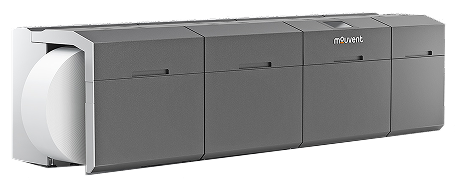
The Zebra ZD621 is specified by Badge Wave at up to 203 mm per second, while the Epson C4000e lists up to 100 mm per second at a stated resolution; these are engine figures, not attendee throughput. The best decision depends on the event requirement, but the relevant factors can be defined and tested before an order is approved. Resolve this point before the necessary work is approved. Late changes can affect templates, stock allocation, staff instructions and the reliability of earlier testing.
Measure the whole journey including search, verification, edits, printing and handover. Use realistic names, roles, records, artwork and equipment rather than a perfect demonstration sample. Run a timed rehearsal with realistic arrivals and exceptions. Repeat this check whenever the relevant artwork, stock, data or equipment changes.
Account for consumables and maintenance
Thermal avoids ink and toner for variable output, while inkjet uses separate CMYK cartridges and a maintenance box. Consumable cost and maintenance are central components of the decision making process, as is the complexity of changing components on the day, because this is what the registration team must deliver under pressure. Use the event's real scale and attendee journey, not a generic best practice detached from the venue. A small meeting and a peak-arrival exhibition may need different answers.
Budget, store and replenish the consumables required by the selected technology and train staff in routine status checks. Use realistic names, roles, records, artwork and equipment rather than a perfect demonstration sample. Replace or replenish an item during rehearsal so the event team knows the process. Use the outcome to set the staffing, stock or artwork rule for this event rather than relying on an assumed universal answer.
Use compatible badge stock
Thermal and inkjet materials are coated differently and are not interchangeable simply because their dimensions appear similar. The decision on what stock to use is practical rather than theoretical: the organiser needs a choice that works with the badge stock, data and event-day process. Keep the choice proportionate to its purpose. Additional fields, colours, devices or process steps should remain only when they solve a defined attendee or operational need.
Order stock listed for the exact printer family and confirm width, sensing and construction. Use realistic names, roles, records, artwork and equipment rather than a perfect demonstration sample. Calibrate each device with production media and inspect feed position across repeated prints. Keep a reference sample with the event kit so operators can distinguish correct output from a developing fault.
Match output quality to the event requirement
Direct thermal printing produces crisp single-colour identification and codes, while the Epson C4000e is listed at up to 1200 × 1200 dpi for detailed colour output. Treat this as a specification question, since a visually attractive option can still fail if it does not work in the intended registration environment. Assign an owner for the decision and its acceptance check. Without ownership, teams may use different versions or make inconsistent corrections under pressure.
Specify the minimum quality the attendee and operational workflow need rather than selecting the highest specification automatically. Use realistic names, roles, records, artwork and equipment rather than a perfect demonstration sample. Compare actual badges at wearing distance and under venue lighting. Record who approved the result and which version was tested to prevent an earlier draft returning at venue setup.
Choose the simpler system that meets the brief
More colour and resolution can add value, but only when the changing content uses them; otherwise they introduce consumables and settings without solving a requirement. The best answer depends on the event requirement, but the relevant factors can be defined and tested before an order is approved. Include the fallback in the design rather than adding it after a failure. The alternative must preserve essential identity, access and registration functions.
Create a must-have list for variable content, speed, portability and integration. Use realistic names, roles, records, artwork and equipment rather than a perfect demonstration sample. Select the system that passes every must-have with the least avoidable complexity. Run the fallback immediately after the main test and confirm that it preserves the essential function.
Thermal versus inkjet decision checklist
List every field that changes per attendee.
Decide whether any variable element must be full colour.
Confirm compatible stock for the exact printer.
Compare production samples, not screen previews.
Test barcode and QR scan reliability.
Include ink or maintenance consumables in planning.
Measure full check-in time, not engine speed.
Document approved settings and fallback stock.
What to record in the approved event brief
The final decision around for thermal vs inkjet badge printing should state the decision reached under how direct thermal printing works, how inkjet badge printing works, and whether or not your event requires fixed branding or variable colour. It should also identify the required speed with completed check-in, the production or configuration version that passed testing, and the date after which changes require another approval. Include the relevant event date, in-hand date, expected attendance, peak arrival pattern, badge size and construction, printer model, stock reference, software or data source, attachment and delivery location. Record the decisions made in testing, who on the day may edit attendee records or authorise reprints, and the fallback that applies if the normal route is unavailable. This written brief gives design, registration, venue and supplier teams one decision to work on, on the day of the event.. It also prevents a late request from quietly changing an assumption that earlier artwork, capacity or scanning tests depended on. After the event, compare the approved brief with actual queue, reprint, stock and support results so the next specification improves from evidence rather than memory.
No. It uses heat-sensitive media and does not require ink, toner or a ribbon for the variable print.
The fixed branding can be pre-printed in full colour, while the on-site thermal printer adds variable information in black.
Inkjet is better when variable logos, photographs, colour coding or other full-colour elements must be produced on demand.
No assumption should be made. Badge Wave supplies media designed for the relevant thermal or inkjet system; confirm the exact product.
Mechanical speed differs, but event throughput depends on search, verification, edits, printing and handover. Test the complete workflow.